
 English
Enter your route, choose when you'll leave, and check the weather along the way. That's the basic workflow in MotoMeteo. Try a ride you know first: it'll be easier to spot an unexpected road or a journey time that looks too short.
The free tier limits how many route forecasts you can calculate. PRO removes that limit and lets you compare departure times across a chosen window. You'll find current prices and terms on the purchase screen.
1. Choose a familiar route
Enter your start and destination, adding stops to get the roads you want. Already planned the ride elsewhere? Import the GPX file instead. Our Calimoto and Kurviger GPX walkthrough explains how.
Check the start, finish and stops, then look at the route on the map when it's available. Does it cross the bridge or pass you had in mind? The forecast won't help much if it's for the motorway and you're taking the coast road.
Keep your navigation app or directions handy for the ride itself. Use MotoMeteo to check the weather for those roads.
2. Choose when you'll leave
Set the date and time you'll actually leave, after packing, fuel and waiting for everyone to turn up. If you imported a recorded ride, set a new departure for this trip; the file's old timestamps aren't your new schedule.
MotoMeteo estimates when you'll reach points along the route. Adding a café as a waypoint tells it where to go, but doesn't allow for forty-five minutes over breakfast. For a long stop, check the ride after it separately, starting at the time you expect to leave. Do the same after an overnight stop.
Double-check the displayed date and time if you're travelling or setting off near midnight.
3. See where the weather changes
Start with the summary, then look closer at anything that might change the ride. The map, timeline and forecast details help you answer three questions:
- Where? Is the rain over the pass, or near the end of the ride?
- When? Will you reach that section before, during or after it? Does the estimated time look realistic?
- What can you do? Leave at another time, take a shorter route, keep waterproofs handy or avoid an exposed road.
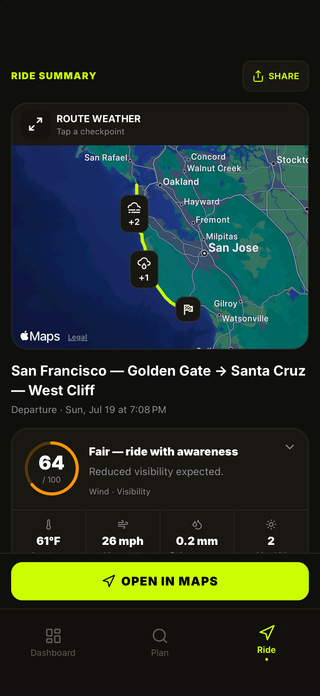
Check the rain amount and timing alongside the percentage. A rain probability doesn't tell you how many minutes you'll be wet; our rain probability guide explains how to read it. Look at wind and gusts too, even if the rain forecast looks better.
4. Allow for a lunch stop
Here's a made-up day out to show how the timing works:
- Leave home at 09:00 and stop for lunch at 11:30.
- Take an hour for lunch and leave again at 12:30.
- Cross an exposed ridge at 13:15, forty-five minutes later.
Check home to lunch with a 09:00 departure, then lunch to your destination with a 12:30 departure. Without the break, the forecast would put you on the ridge about an hour early. That could mean checking a different part of the day's weather.
If strong afternoon gusts are forecast on the ridge, try a lower road from the lunch stop or shorten the day. Check the new route and its arrival times too; changing the time of your lunch stop doesn't tell you what the rest of the ride will be like.
5. Compare your options and save the route
If your start time is flexible, check another departure within your forecast allowance. PRO can compare a window of departure times for you. Look at the details as well as the overall result: the suggested option may still have a wet or windy section. Our departure-time guide walks through an example.
Save routes you ride regularly, then get a fresh forecast each time you use them. For a day trip, check the ride home separately before you leave.
Check official weather warnings and road closures too. A forecast can't tell you whether a pass is open or how much grip you'll find on a bend. Recheck before leaving or when safely stopped, and change the plan if the conditions you find are worse than expected.
MotoMeteo is available for iPhone, iPad and Android. Download the app to try it, or see the feature overview for more details.